A skill that tells your agent whether it cloned a PDF right
Easybits Team
6 min de lectura
skills
When an agent turns a PDF into HTML, the only judge is usually the agent itself or a person comparing both pages and saying "looks right". Neither scales: the agent approves its own work, and the person gets tired by page three.
Today we're releasing easybits-clone-verify, a skill that gives the agent an outside judge. It compares the clone with the original PDF page by page and returns a verdict that doesn't change between runs, with a list of what's wrong and at which coordinates. The agent fixes that and measures again until the page passes.
Where the idea comes from
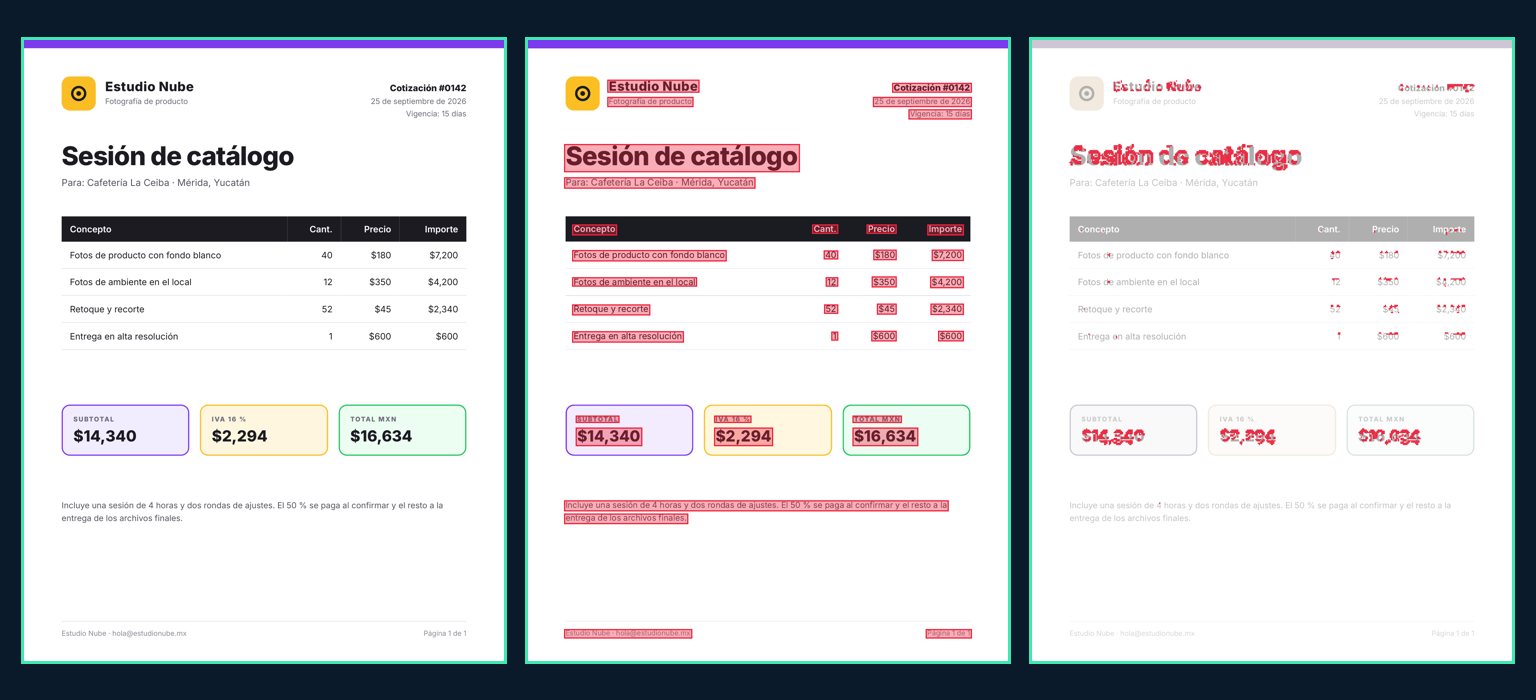
Steve Sewell, from Builder.io, recently described how he took the Figma and Google Slides imports in his open-source project from a 20–88 % difference to under 2 %: he left an agent working over a weekend against a fixed number instead of reviewing every result himself. The number was a pixel diff, an image that paints in red every point that doesn't match between the original and the copy.
The useful part is the division of labor: the agent writes the code and the person designs the verifier. With a good verifier, the agent can iterate for hours unsupervised.
The problem with measuring only pixels
Our first version did exactly that: pixelmatch on the original and the copy, plus a check of the HTML text. Before announcing it, we pointed an agent at it with one instruction: make it pass without really cloning. It found 13 ways. The simplest ones:
- Paste the PDF as an image and hide the correct text underneath. Pixel-identical, and the text "exists".
- Show one thing on screen and another when printed, with
@media print. - A font with swapped glyphs: the HTML says "7" and a "9" is drawn.
- A box the color of the background over one word.
An agent optimizing a number will find these shortcuts, even if nobody asks it to. So the version we're releasing measures what the browser paints, never the source code.
What it measures
The clone is printed to PDF twice, without JavaScript, and captured once on screen. The original, the clone, and the clone without its text go through the same rasterizer (MuPDF), so a faithful clone scores zero difference and any deviation is real.
Text, character by character. Every word in the PDF must exist as DOM text, written in the HTML, within 1.5 pt of its place. None may be missing and none may be added. Position comes from each character's origin and baseline, which don't depend on how the font was embedded.
Typography. Same family, size, color, and word width. Weight and italics are read from the font descriptor inside the PDF, because names lie: Chrome names every weight of a variable font "Inter-Regular". Width catches the letter spacing that Word exports use; without it, numbers in a table run into the next column.
Live text. If, with the printed PDF's text removed, a line's area still looks like that text, what's there is an image. It works even if the image is shifted or blurred by a few pixels.
Visibility and shape. Every word must be visible (not covered) and drawn with the original's glyphs, compared character against character.
Composition. Backgrounds, colors, tables, and logos, measured on average and in the most different small region. On a mostly white page, deleting a 60 px logo barely moves the average; the region gives it away.
Screen equals print. The text comes from the print, so what shows on screen has to be the same.
The thresholds are fixed. The caller is usually the same agent being graded, and if it could pass zero thresholds everything would pass.
How we tested it
We built a battery that generates, from any PDF, a faithful clone and about 25 cheating variants, and requires each one to be classified correctly and for the right reason. On three very different PDFs (a Word export with tables, a Google Docs document in Arial, and a Chrome-generated report in variable Inter) it scored 81 of 81. All 22 of the attacking agent's tricks fail, and in production the verdicts match the local ones.
The battery corrected us several times too: the fine-grained diff painted letter anti-aliasing red on correct clones, Debian's MuPDF silently lost font names, and Unicode normalization accepted "m2" where the original says "m²".
The agent's loop
The skill teaches the agent to work like this:
- One page per file (
page-1.html,page-2.html…), designed at the PDF page's size: points × 4/3. A US-letter page is 816 × 1056 px. - Measure:
node scripts/compare.mjs --pdf <fileId or URL> --dir ./clone. - Read the first reason of the first failing page. Reasons come in Spanish, with the word and its position: «1 palabra(s) existen pero no se ven (tapadas o invisibles): «Estudio» (138,87)».
- Fix it and go back to step 2 until the command exits 0.
The HTML must be static: no scripts, @media, backdrop-filter, mix-blend-mode, or external stylesheets (Google Fonts are fine). A PDF page doesn't need them, and they're exactly what would let the screen show something different from the print.
Without the skill
The same verification is available in the API, the SDK, and MCP:
In MCP the tool is compare_render, and fleet agents always have it on their render MCP. It costs one credit per page and accepts up to 20 pages per call.
Limits
Gradient text made with background-clip: text can fail even when the clone is correct. And the verifier compares against the PDF, so if the original uses a paid font you can't load, the page won't pass until you have it: thresholds can't be relaxed per call.
The skill is at easybits.cloud/skills and github.com/blissito/easybits-skills. The full reference is in the documentation.

